How to build a construction schedule in Excel (with a 12-week example)
A construction schedule in Excel needs one row per task with its phase, trade, duration in working days and the task that must finish first. Start dates are then calculated from those links, and inspections and permits are listed as their own rows or flags. The longest chain of linked tasks, the critical path, sets the finish date.
On site, a task can only start when the task before it is finished, the right trade is free, the inspector has signed off and the permit is in hand. A good Excel schedule records all four and calculates the dates for you.
What a construction schedule needs
Phases. Group tasks into stages such as pre-construction, substructure, shell, first fix, finishes and handover, so you can report progress at a level the client understands.
Tasks with durations in working days. One row per piece of work. Use working days, not calendar days, and let the spreadsheet skip weekends and holidays when it turns them into dates.
Dependencies. For each task, record the task that must finish before it can start (a finish-to-start link): the slab cannot be poured until the footings are inspected, and drywall cannot go up until the services are roughed in. A delay early in the job then flows through to every later date.
Trades. Tag each task with its trade, so you can filter by subcontractor and spot double-booked crews.
Hold points and inspections. A hold point is a step where work stops until something is inspected or approved. Rushmoor Borough Council's site-inspection page, for example, lists start of work, foundations (checked before concrete is poured), oversite, drains (inspected before they are covered), structural works, insulation (inspected before covering), fire safety and completion. Stages vary by authority, so take the list from your own approval and give each inspection its own row or flag.
Permits and approvals. Some work cannot start until an approval is granted. In England, for example, GOV.UK explains that building work may need approval from a building control body, and that with a building notice you can start work 2 days after the notice is submitted. Track each permit's status and link the first affected task to it, so a late approval shows up in the finish date.
A worked 12-week example
A single-storey extension on a Monday-to-Friday week with no holidays, with the building permit approved before site setup. Every link is finish-to-start with no lag; a task with several predecessors starts the working day after the last one finishes. A script calculated the dates, floats and critical path.
Project start: Mon 01 Mar 2027. Total duration: 60 working days, which is 12 weeks. Planned finish: Fri 21 May 2027.
| # | Task | Trade | Days | Predecessors | Start | Finish | Float (days) | Note |
|---|---|---|---|---|---|---|---|---|
| 1 | Mobilise and set up site | General contractor | 3 | - | Mon 01 Mar | Wed 03 Mar | 0 | critical |
| 2 | Excavate footings | Groundworks | 4 | 1 | Thu 04 Mar | Tue 09 Mar | 0 | critical |
| 3 | Footing inspection | Inspector | 1 | 2 | Wed 10 Mar | Wed 10 Mar | 0 | HOLD POINT, critical |
| 4 | Pour footings and slab | Concrete | 5 | 3 | Thu 11 Mar | Wed 17 Mar | 0 | critical |
| 5 | Frame walls and roof | Carpentry | 8 | 4 | Thu 18 Mar | Mon 29 Mar | 0 | critical |
| 6 | Roof covering | Roofing | 5 | 5 | Tue 30 Mar | Mon 05 Apr | 0 | critical |
| 7 | Windows and external doors | Glazing | 4 | 5 | Tue 30 Mar | Fri 02 Apr | 1 | |
| 8 | Exterior cladding | Carpentry | 8 | 7 | Mon 05 Apr | Wed 14 Apr | 23 | |
| 9 | Plumbing rough-in | Plumbing | 5 | 6, 7 | Tue 06 Apr | Mon 12 Apr | 0 | critical |
| 10 | Electrical rough-in | Electrical | 5 | 6, 7 | Tue 06 Apr | Mon 12 Apr | 0 | critical |
| 11 | HVAC rough-in | HVAC | 4 | 6, 7 | Tue 06 Apr | Fri 09 Apr | 1 | |
| 12 | Pre-cover inspection | Inspector | 1 | 9, 10, 11 | Tue 13 Apr | Tue 13 Apr | 0 | HOLD POINT, critical |
| 13 | Insulation | Insulation | 3 | 12 | Wed 14 Apr | Fri 16 Apr | 0 | critical |
| 14 | Drywall hang and finish | Drywall | 7 | 13 | Mon 19 Apr | Tue 27 Apr | 0 | critical |
| 15 | Painting | Painting | 5 | 14 | Wed 28 Apr | Tue 04 May | 0 | critical |
| 16 | Cabinets and flooring | Joinery / flooring | 5 | 15 | Wed 05 May | Tue 11 May | 0 | critical |
| 17 | Fixtures fit-off | Electrical / plumbing | 4 | 16 | Wed 12 May | Mon 17 May | 0 | critical |
| 18 | Final inspection | Inspector | 1 | 8, 17 | Tue 18 May | Tue 18 May | 0 | HOLD POINT, critical |
| 19 | Snag list and handover | General contractor | 3 | 18 | Wed 19 May | Fri 21 May | 0 | critical |
How to read the table:
- Days are working days. Task 2 takes 4 of them, Thu 04 Mar to Tue 09 Mar, skipping the weekend.
- Predecessors are finish-to-start links. The three rough-in trades (tasks 9, 10 and 11) all wait for both the roof covering (task 6) and the windows and doors (task 7), so the building is weathertight before services go in.
- Float is how many working days a task can slip without moving the finish date. Exterior cladding (task 8) has 23 days of float, because nothing but the final inspection waits for it.
The critical path in plain words
The critical path is the longest chain of linked tasks from start to finish. Wikipedia's article on the critical path method defines it as "the sequence of project network activities that adds up to the longest overall duration". Tasks on it have zero float: if any of them slips by a day, the handover slips by a day.
In this example the critical path is tasks 1 > 2 > 3 > 4 > 5 > 6 > 9 > 10 > 12 > 13 > 14 > 15 > 16 > 17 > 18 > 19, and it ends after 60 working days. Tasks 9 and 10 run on the same dates and are both critical. The roof, not the windows, releases the rough-in trades.
What this means on site:
- Protect the critical tasks. A late roofer delays handover; a late cladding crew does not, within its float.
- Book inspections early. Every hold point here is critical: a day's wait for the inspector moves handover by a day.
- Use float to smooth crews. The cladding's float lets that crew work when it suits the job.
- Recalculate when things change. The critical path can move: HVAC rough-in joins it as soon as it slips by more than its one day of float.
How our construction edition handles trades, hold points and permits
Our Construction Schedule Template is a Gantt schedule for Excel. Scripts recalculated it in Excel for Mac 16.114.3 and LibreOffice. Google Sheets has not been tried.
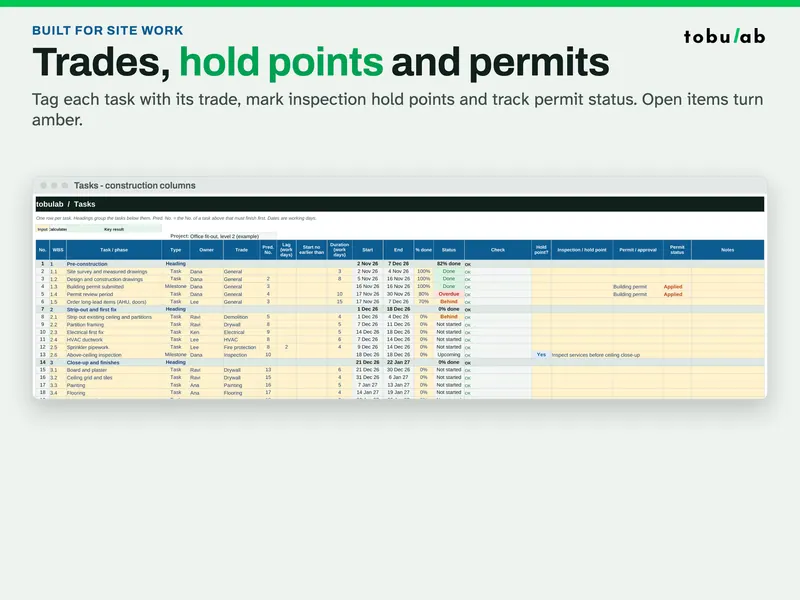
- Calculated dates from durations in working days and finish-to-start links (with lag or overlap), on your choice of working week (Mon-Fri, Mon-Sat, Sun-Thu, Sat-Wed or 7 days) and your own holiday list.
- Trade column with your own trade list.
- Hold point? flag and inspection note on any task or milestone.
- Permit / approval with a status: To apply, Applied, Approved or Rejected. Open items turn amber.
- Dashboard listing open hold points by date and permits not yet approved, plus progress against plan, overdue tasks and upcoming milestones.
- Automatic Gantt chart in day or week view, with % done shading, milestones, a today line and shaded non-working days.
- Status, RAID log and resource load: status updates itself against your status date, and each person's work days per week turn red when overloaded.
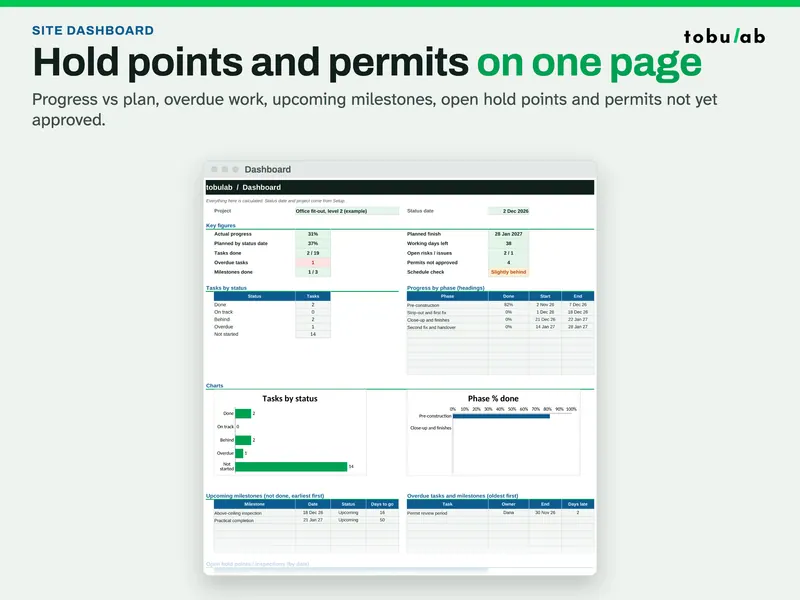
The filled example is an office fit-out on one floor: 4 phases, 22 tasks and milestones, 5 leads, 11 trades, 4 hold points and 3 permits. A blank copy and a 4-page PDF quick-start guide are included. It has 150 task rows and print areas set for A4 landscape on every tab, and it has no macros.
It is built for small and medium jobs; for critical-path analysis of large programmes, use dedicated scheduling software. Hold point and permit fields are reminders: follow your contract, the authority having jurisdiction and your safety plan.
The Project Management Bundle includes this construction edition together with the Project Planner + Gantt and the Small Business Dashboard editions.
Questions
- What is a hold point in a construction schedule?
A hold point is a step where work must stop until something is checked or signed off, typically an inspection. The next task cannot start until it is released, so it belongs in the schedule as its own task or flag.
- What is the critical path?
It is the longest chain of linked tasks from start to finish. Those tasks have no float, so a delay to any of them moves the finish date. Tasks off the critical path can slip by their float without delaying handover.
- Should durations be in calendar days or working days?
Working days. Crews don't work every calendar day, so count working days and let the spreadsheet skip weekends and holidays when it turns durations into dates.
- Is Excel enough for scheduling a construction project?
For small and medium jobs with finish-to-start links, yes. Large programmes with many link types and resource levelling are better handled in dedicated scheduling software.
Sources
- Wikipedia: Critical path method
- Rushmoor Borough Council: Building control site inspections
- GOV.UK: Building regulations approval
- GOV.UK: Building regulations approval, how to apply
Updated 2026-10-26 · by tobulab